If we want to get the graphical user interface of a linux PC
from remote machine, then we have to enable the VNC service on that
linux machine. We can enable the vnc by following ways in Redhat linux
machine:


VNCSERVERS=”1:root”
VNCSERVERARGS[1]=”-geometry 800×600″

1. Set vnc password using #vncpasswd.
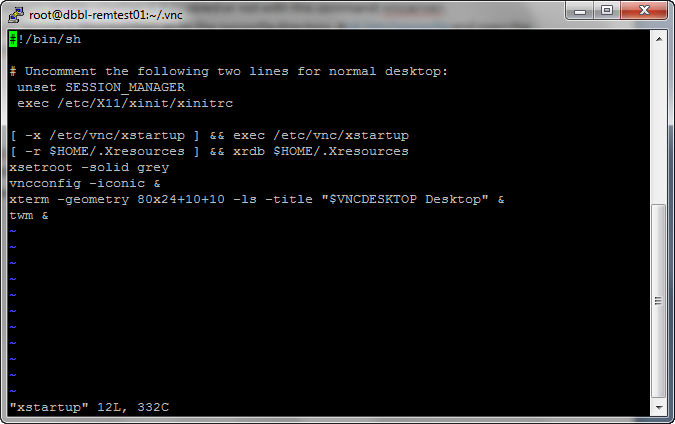
1. Go to directory #/root/.vnc/ and edit xstartup file using # vi xstartup as like just uncomment first two line.
unset SESSION_MANAGER
exec /etc/X11/xinit/xinitrc

1. Stop ,run and restart vnc service using #service vncserver stop/start/restart

- Check the vnc service whether it is enabled or not with this command: vncserver.

- If the vnc service is disabled then go to the sysconfig directory. #cd /etc/sysconfig and open the file vncservers with the command, vi vncservers.
VNCSERVERS=”1:root”
VNCSERVERARGS[1]=”-geometry 800×600″

1. Set vnc password using #vncpasswd.
1. Go to directory #/root/.vnc/ and edit xstartup file using # vi xstartup as like just uncomment first two line.
unset SESSION_MANAGER
exec /etc/X11/xinit/xinitrc
1. Stop ,run and restart vnc service using #service vncserver stop/start/restart


No comments:
Post a Comment